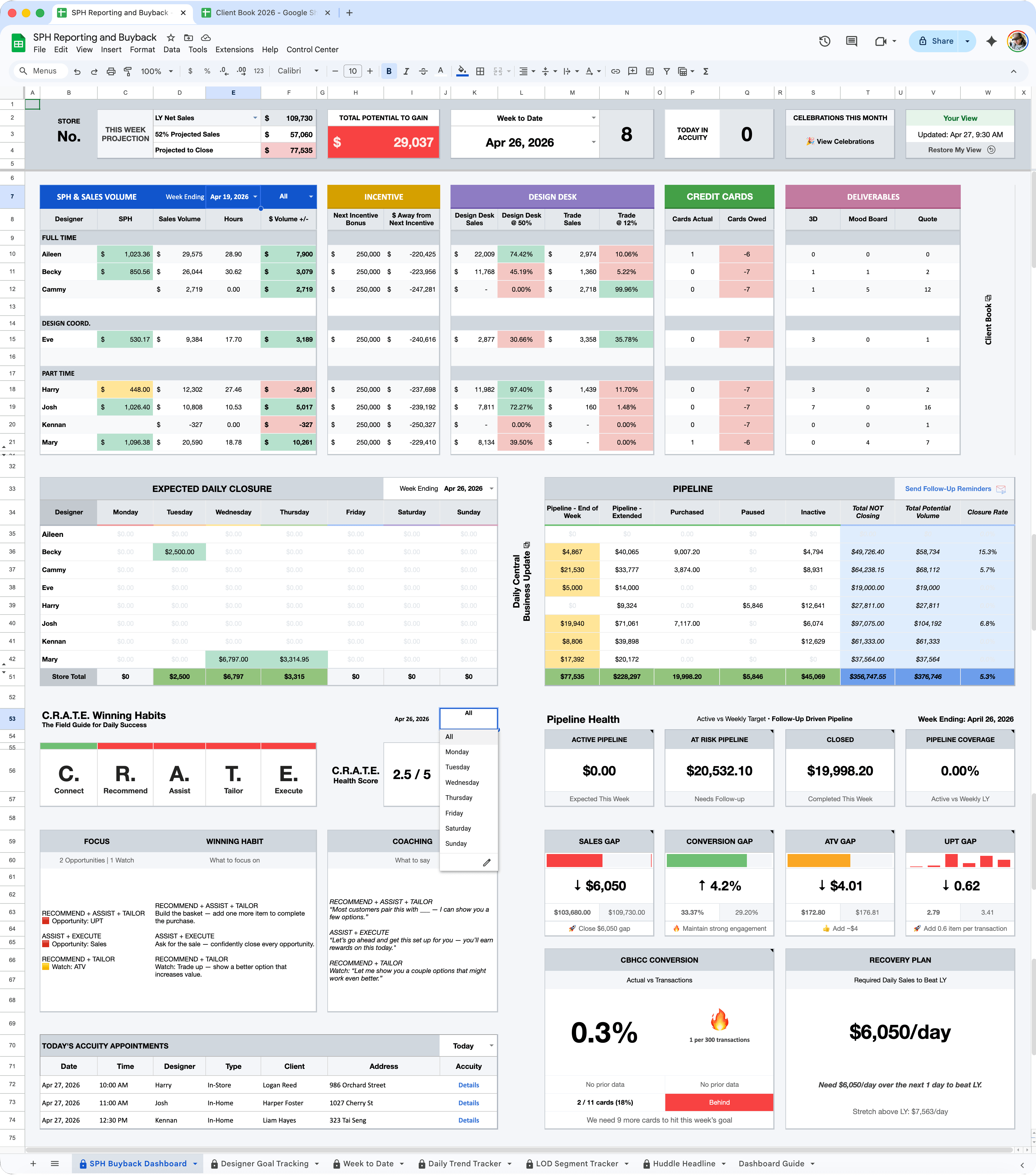
At a glance.

Unified fragmented reporting into one dashboard.

Created a single source of truth for KPI performance, pipeline activity, and daily priorities.

Automated workflows and manual processes.

Reduced repetitive tasks through dynamic formulas, scripts, and auto-updating views.

Improved KPI visibility and pipeline management.

Surfaced performance gaps, revenue opportunities, and follow-up priorities in real time.

Enabled faster decision-making for team leaders.

Turned complex data into clear actions that helped teams focus on what matters most.

The Challenge.

Performance data, pipeline tracking, and daily priorities lived across multiple disconnected tools. This made it difficult to quickly identify gaps, align teams, and make proactive decisions.

The Opportunity.

Create a centralized system that turns data into clear actions, reducing friction, improving visibility, and helping teams focus on what matters most.

My Role.

As Team Leader, Design & Trade, I independently identified workflow inefficiencies, defined the product vision, designed the user experience, and built the system end-to-end using Google Sheets, Apps Script, and AI-assisted development.

How It Works.

Four core systems designed to turn data into action and operations into outcomes.

01.

Turn Metrics Into Action.

Convert KPI gaps into daily priorities, coaching actions, and winning habits.

  • Connect = Conversion + Credit Card
  • Recommend = ATV + UPT
  • Assist = UPT + Sales
  • Tailor = ATV + UPT
  • Execute = Sales + Credit Card

02.

Pipeline Intelligence.

Surface revenue opportunities, at-risk pipeline, expected closures, and follow-ups.

  • Active pipeline
  • Expected closures
  • Follow-up opportunities

03.

Workflow Automation.

Automate repetitive reporting and dashboard updates to improve speed, accuracy, and focus.

  • Dynamic formulas
  • Apps Script triggers
  • Auto-updating views

04.

AI-Assisted Development.

Use AI to accelerate prototyping, debugging, logic creation, and iteration of scalable internal tools.

  • Formula logic
  • Script creation & debugging
  • Workflow ideation
  • Faster iteration cycles

Design Principles.

Reduce cognitive load.

Surface priorities quickly.

Make data actionable.

Keep interfaces intuitive.

System Design.

How users interact with the dashboard and how data becomes actionable insights.

System Flow Diagram.

How data becomes actionable insights inside the dashboard.

Data Sources.

  • Daily Trend Tracker
  • Week to Date
  • Client Book

Processing Layer.

  • Formulas (Google Sheets)
  • Apps Script Automation
  • AI-Assisted Logic

Control Center Dashboard.

  • Performance Insights
  • Habits & Coaching
  • Pipeline Intelligence
  • Calendar Visibility

User Actions.

  • Identify Performance Gaps
  • Prioritize Follow-Ups
  • Coach Team Behaviors

Outcomes.

  • Faster Decision-Making
  • Increased Visibility
  • Improved Performance

User Flow Diagram.

How leaders interact with the dashboard to identify priorities, coach behaviors, and improve outcomes.

Select Filters.

  • Week / Month / Quarter / Year
  • Designer View
  • Day Analysis

Review Insights.

  • KPI performance
  • Pipeline health
  • Habits score
  • Calendar visibility

Identify Gaps.

  • Low conversion
  • Weak pipeline
  • Missed follow-ups
  • Sales gaps

Take Action.

  • Coach winning habits
  • Prioritize outreach
  • Shift daily focus
  • Improve execution

Track Results.

  • Improved KPIs
  • Pipeline movement
  • Higher Closure Rate
  • Better Follow-Up Execution

Impact Metrics.

How the Control Center improved visibility, speed, and operational decision-making.

01.

30–50%

Reduced manual reporting time by 30–50%

02.

1 Dashboard

Consolidated 3+ data sources into one system

03.

Minutes, Not Hours

To identify priorities and take action

04.

Daily Visibility

Enabled same-day visibility into performance gaps

Key Takeaways.

Building the Control Center reinforced that the best tools don’t just display data, they help people make better decisions.

By combining automation, clear UX, and actionable insights, I saw how thoughtful systems can reduce friction, improve alignment, and create measurable impact.

This project strengthened my passion for designing products that simplify complexity and help teams perform at their best.

Let’s build smarter experiences together.

I’m open to roles where design can simplify complexity and create measurable impact.